

 If you’ve ever submitted an HR request and wondered where it was in the process, or sent a quick follow-up just to check, you’re not alone. Many of HR’s processes have relied on PDF forms and email approvals, which can make it hard to see progress or know when something is complete.
The new HR Client Portal (TDX) is here to make that experience simpler, clearer, and easier to manage from start to finish.
Introducing the HR Client Portal
The HR Client Portal provides a centralized, self-service space for submitting and managing HR requests. Rather than relying on email-based processes, some requests are now submitted through structured forms and tracked from start to finish.
This shift supports a more consistent and transparent experience by:
-
-
- Submitting requests through a guided, consistent process
- Routing requests to the appropriate team more efficiently
- Offering clear status updates and request history
- Supporting more consistent workflows and processing
-
As outlined in our communications, this is part of HR’s broader effort to improve service delivery and create a more streamlined and responsive experience for employees and managers.
What’s Available Now
The HR Client Portal already includes a key service: Professional Development Applications and we are continuing to expand what’s available.
Two additional services are now live:
1. Service Catalog > Recruitment > Auxiliary Request
Departments can now submit auxiliary placement requests directly through the portal. The form captures all required information previously captured in the mach form with the addition of multiple approvals. Once submitted, a ticket is created, allowing you to track progress and status through to completion.
2. Service Catalog > Total Compensation > 10% Acting/Additional Duty Pay
Requests for temporary acting or additional duties pay can also be submitted through the portal. The process brings together all required details and approvals into a single workflow, with a trackable ticket that provides visibility throughout the process.
Getting Started
Start by visiting the HR Client Portal
Click on the Service Catalogue to see available tickets.
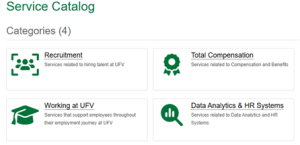
Select the heading related to your request.
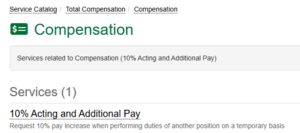
The landing page for the ticket will provide information on required details and approvers. Complete the required fields and click submit.
For submitters that are also approvers, you will receive an email confirmation of successful submission and a second email requesting you approve the ticket. Make sure to approve the ticket to successfully submit the ticket.
To see the status of a ticket you submitted or one you have approved, click the My Tickets button.
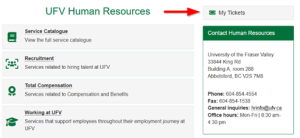
From here you can search for all your Ticket Requests or My Approvals.
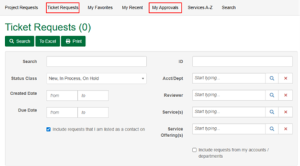
In one convenient portal you can see the history of all tickets and approvals and the status of your tickets, so you know exactly at what stage in the process your request is at.
Looking Ahead
This is the beginning of a broader shift toward more modern, accessible HR services. Additional request types will continue to be added over the coming months as we expand the offerings.
We look forward to building on this foundation and continuing to improve how HR supports UFV.